
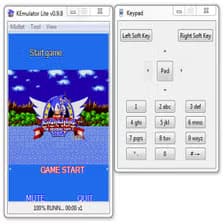
Screenshots
About KEmulator
Run Java mobile games and applications on your Windows PC with KEmulator, the versatile J2ME emulator that brings retro and modern Java programs to life on your desktop.
Choose from a wide selection of mobile phone models to emulate, letting you test and play applications exactly as they would appear on authentic devices. KEmulator loads JAR files seamlessly and supports APIs for virtually any type of J2ME program, giving you flexibility in what you can run. Control your emulated device using your keyboard or switch to the built-in on-screen interface whenever you prefer.
Experience smooth gameplay and visually rich applications thanks to comprehensive graphics engine support. KEmulator handles both 2D and 3D graphics with impressive compatibility, allowing even graphically demanding games to run without compromise. Activate pixel interpolation to automatically scale graphics to any resolution, ensuring crisp visuals whether you're playing on a small window or maximizing your screen real estate.
Whether you're revisiting classic Java games, testing legacy applications, or exploring the J2ME library of mobile software, KEmulator delivers reliable emulation with authentic device behavior. The straightforward interface makes setup quick—just load your JAR files and start playing.
Bring your Java mobile collection to Windows with KEmulator and rediscover the golden era of mobile gaming and applications on your PC.
Pros & Cons
Pros
- Supports a wide range of J2ME applications and APIs
- Comprehensive graphics engine handles both 2D and 3D content
- Pixel interpolation automatically scales graphics to any resolution
- Choose from multiple phone models to test authentic device behavior
Cons
- Limited to Windows; no macOS or Linux support
- Emulates obsolete J2ME platform with shrinking software library
- Requires manual JAR file sourcing; no built-in app store or library
- No mention of cloud save or cross-device sync functionality
Related Apps

Open TV
IPTV player for Windows — stream online content with M3U playlists and Xtream accounts, open source.

WinToFlash
Create bootable Windows USB drives from CD/DVD installation media with WinToFlash.

Linux Mint
Linux operating system based on Ubuntu with easy installation, free apps, and 8000+ Steam games compatible.

iVCam
Use your smartphone as a webcam on PC via iVCam — WiFi or USB, multiple resolutions, background blur, and chroma key.

Microsoft .NET Framework
.NET Framework runtime for Windows — run and build apps with security and system integration.

Android-x86
Run Android on PC with x86 architecture. Free, open-source desktop OS for developers.
Latest Articles

7 best apps for birthday reminders on Android in 2026
Jul 12, 2026

Best apps for D&D character sheets on Android in 2026 (7 tested)
Jul 12, 2026
Best apps for gaming on integrated graphics for desktop in 2026 (we tested 7)
Jul 12, 2026

Best apps for live sports streaming on desktop in 2026
Jul 12, 2026

Best apps for movie tracking on Android in 2026 (free and paid)
Jul 12, 2026